More context for support
Find the preferences and details a shopper has shared, connected to their Shopify record.
 Give your Shopify store a memory
14-day free trial
Give your Shopify store a memory
14-day free trial
Your developer builds the experience.
FieldsRaven saves each shopper’s choices to their customer record in your Shopify store.
Installs from the Shopify App Store
Then US$29.99/month per store, billed through Shopify · Developer setup required
Illustration of a custom storefront: a shopper saves a rug design, favorites a lamp, and saves their style preferences, and each one appears in their account.
Trusted by 17 Shopify Plus stores
Save wishlists, designs, and profiles to Shopify.A critical function that we needed was for customers to be able to design rugs and save them to their account.
The only way I could figure to make this happen was through the use of metafields. I found FieldsRaven organically in the Shopify App Store… I created a JSON metafield and was able to get it to work. It’s an extremely useful app to have.
Shoppers make choices in your store every day. Without somewhere to save them, they’re gone by the next visit. See how a saved design, a favorite, and a preference stay with each shopper’s account.
Example experiences powered by FieldsRaven.
Developer setup required.
Jamie, a shopper, designs a rug (Diamond pattern, Sage colorway, 8 × 10) and saves the design to their account, favorites a ceramic table lamp, and saves two style preferences. FieldsRaven saves each one to Jamie’s customer record in Shopify as a metafield. Fields you enable then sync to Klaviyo or Airtable; the saved design stays in Shopify only. These are examples of custom storefront experiences built by your developer. The video has instrumental background music and no narration.
Six ways stores have used FieldsRaven. Start with one, then adapt it to your store.
Give customers a place to keep custom configurations and pick up where they left off. Their choices stay connected to their customer record in Shopify.
Illustration: a shopper designs a rug, choosing a diamond pattern, Sage colorway, and 8 × 10 size, then saves the design to their account.
Build a wishlist that looks like your theme and remembers each signed-in shopper’s favorites.
Illustration: a shopper taps the heart on a backpack, sneakers, and sunglasses, and all three appear in their saved favorites.
Connect your custom quiz or preference form to customer fields. Keep useful answers available for your storefront and team.
Illustration: a shopper answers a two-question style quiz, and their answers are saved as a style profile.
Let customers register serial numbers and purchase details in your store, saved to their customer record in Shopify where your support team can find them.
Illustration: a shopper registers an espresso machine with its serial number and purchase date.
Save shopper preferences in Shopify, then send them to Klaviyo as profile properties for your segments and flows. You choose which customer fields sync.
Illustration: a shopper’s saved interest, hiking, arrives in Klaviyo as a profile property and becomes an email idea about trail boots.
Let customers save their vehicles once instead of entering the same details each visit. Your storefront reads the saved vehicle, and your fitment tools decide what fits.
Illustration: a shopper adds a 2025 Lucid Gravity to a saved garage that already holds a 2024 Rivian R1S, and the store switches to that vehicle.
These are custom storefront experiences, not widgets added automatically at install.

Have an idea but not sure how to build it with FieldsRaven? Just reach out. I'm happy to help you figure it out.
Bring saved preferences, registrations, and customer details into Shopify admin, Klaviyo, and Airtable. Choose what gets shared when you configure your fields.
Illustration: Jamie’s three saved fields pass through FieldsRaven, which saves each one to their customer record in Shopify first. The favorite product is then shared with Klaviyo, the style profile with Klaviyo and Airtable, and the saved design stays in Shopify only.
Find the preferences and details a shopper has shared, connected to their Shopify record.
Send supported customer details to Klaviyo for email, or to Airtable as a new row.
Use the same app for saved designs, wishlists, profiles, and other custom experiences.
Start with code generated for your field, plus step-by-step recipes. Adapt the interface to your store, then connect and test the experience.
Connect the FieldsRaven MCP server to Codex, Claude Code, or Cursor to configure fields, get starter code, and check saved submissions.
Storefront design, integration, and testing are handled by you or your technical team.
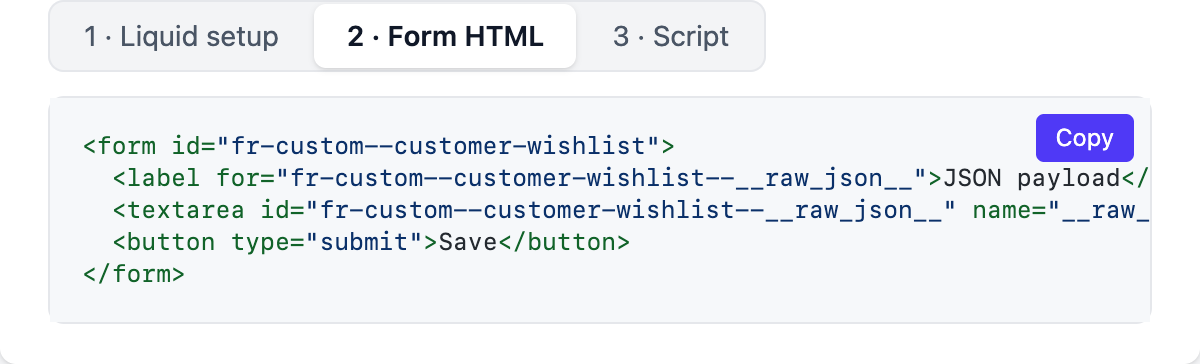
Scroll sideways to see more code
const cfg = window.FR_CUSTOM__CUSTOMER_QUIZ_PROFILE;
const payload = { skin_type: "combination" };

const response = await fetch("/apps/raven/create_metafield", {
  method: "PUT",
  headers: { "Content-Type": "application/json" },
  body: JSON.stringify({
    raven: {
      raven_id: cfg.ravenId,
      resource_id: cfg.resourceId,
      raven_mac: cfg.ravenMac,
      value: JSON.stringify(payload)
    }
  })
});You build the storefront experience. FieldsRaven handles the request and saves the information to Shopify.
A design, a favorite, or a preference, through your custom storefront.
The request is verified, recorded, and queued for saving.
The latest value lives in a Shopify metafield, where your theme, Shopify admin, and other apps can read it.
Supported data goes to Klaviyo or Airtable if you enable and configure them.
The Shopify save and any enabled integrations run in the background after FieldsRaven accepts the request.
“This app is great and easy to use. If you need to have customers be able to save data to their account, use metafields and this app. I've never had a problem with it and I hope it stays around for a long time.”
“Highly recommend this app. We have had great success with it. Thank you very much”
“FieldsRaven works great!”
Running since 2021, maintained by its founder.
Wishlists, saved designs, quiz profiles, and more, all in one app instead of one app per feature.
Your trial and billing
Your first 14 days are free. Uninstall before the trial ends to avoid the first FieldsRaven charge. Uninstalling later stops future recurring charges; a current or pending Shopify-billed charge can remain.
Your saved values stay in Shopify
Uninstall anytime. The metafields and metaobjects FieldsRaven wrote stay in your store, and new saves stop. FieldsRaven removes its active shop, configuration, and submission records and keeps a separate uninstall record containing store and account information for operational history (Privacy).
Installs from the Shopify App Store.
Request rate limits apply. Developer setup required.
Custom storefront development is not included.
More detail in the documentation (opens in a new tab), or ask the person who built it.
Email KarimDeveloper setup is required. You can build and connect the storefront experience yourself if you are comfortable with Shopify theme code, or work with a developer. FieldsRaven handles saving the information and the integrations you configure. Generated starter code, recipes, and the FieldsRaven MCP server for Codex, Claude Code, and Cursor give your technical team a head start.
No. Installing FieldsRaven does not automatically add these custom experiences. Build the storefront interface yourself or with a developer, then connect it to your configured fields using the starter code and recipes where helpful.
The customer-based wishlist and saved-design recipes require shoppers to sign in. That connects saved information to their Shopify customer record so they can return to it later. Product and page fields can accept saves from signed-out shoppers when the request passes verification.
The smallest setup is one field and one button: configure the field, add its Get Code output to your theme, and test a save. Larger experiences take longer, depending on what you build. Recipes, generated starter code, and the FieldsRaven MCP server for Codex, Claude Code, or Cursor give you a head start, but custom storefront design, integration, and testing still take time.
FieldsRaven uses standard Shopify Liquid and JavaScript. Add and style the forms, buttons, or interactions to fit your theme, yourself or with a developer.
Your 14-day trial is free. After that, FieldsRaven costs US$29.99 per month per store, billed through Shopify. Uninstall before the trial ends to avoid the first FieldsRaven charge. Uninstalling later stops future recurring charges, although a current or pending Shopify-billed charge can remain. Your metafields remain in your store, but new FieldsRaven saves stop after uninstalling.
Karim, a solo developer who has built Shopify stores since 2016 and runs FieldsRaven himself. Support emails go straight to him.
The saved value lives in Shopify as a metafield. While the app is installed, FieldsRaven keeps submission records so it can track the Shopify write and enabled integrations. Uninstalling removes the active shop, configuration, and submission records from FieldsRaven; your Shopify metafields and metaobjects remain. FieldsRaven currently retains a separate uninstall record containing store and account information for operational administration and history.
Every request must pass Shopify’s app-proxy verification. Standard resource-ID submissions also carry a per-store signature tied to the field and resource. A request can target only an active field you configured, and FieldsRaven validates the required parameters and field type before queuing the save. The value still comes from the storefront, so use the optional approval step when a submission needs moderation.
Not on its own. Installing FieldsRaven adds nothing to your storefront, and your storefront sends a request only when a shopper saves something. The optional Storefront Kit is only needed for FieldsRaven’s example theme extensions; the generated code works without it. The overall impact depends on the experience you build, so test it on your theme.
Share the experience you want to build, the relevant recipe, and your field’s generated Get Code output. A compatible coding tool can also connect to the FieldsRaven MCP server to configure fields, retrieve starter code, and check submission status. Your technical team still needs to integrate, style, and test the storefront experience.
FieldsRaven doesn’t currently add a separate export button. Saved values are standard Shopify metafields, so you can view them on the corresponding resource page in Shopify admin, for example, the customer, product, page, or collection where each value is stored. If a field isn’t displayed there, you can display or pin its metafield definition in Shopify's custom data settings. For a bulk file export, use a Shopify-compatible metafield export tool.
Single-line text, multi-line text, integer, decimal, and JSON, plus product, product-list, and metaobject references for advanced setups. JSON lets you save a small object, such as quiz answers or a saved configuration, as one field.
Yes. Turn on metaobject sync for a JSON field to attempt to mirror each successfully mapped save into an entry in a Shopify metaobject definition you own. The latest value still saves as a metafield first, so a mapping problem does not lose the submission. For customer fields, you can also opt in to link those entries back to the customer.
Yes, for the customer fields you enable. After a successful Shopify save, FieldsRaven updates the shopper’s existing Klaviyo profile, matched by email; it does not create profiles. A text or number field becomes a property named after the field key. A JSON object contributes one property per key, and a list of objects contributes numbered properties, such as product_handle_1.
Yes, for customer JSON fields. When the object keys match your table’s column names, each successful Shopify save queues a new Airtable row. JSON arrays aren’t currently supported.
I’ve been building Shopify stores since 2016. Store after store needed the same thing: a way to remember what its customers had shared or saved.
I built FieldsRaven in 2021 to make that possible. I still build and maintain it, and support emails come directly to me.
Have an idea for your store?
Tell me what you’d like to build
Start the trial, send your developer a recipe, and test your first save before day 14.
Start 14-day free trial (opens in a new tab)Installs from the Shopify App Store · Then US$29.99/month per store, billed through Shopify
Developer setup required. Have a question? Email Karim